
Test Mobile Usability: Optimize Consultation Forms for Patient Acquisition
To test mobile usability for online consultation forms, clinics must assess and refine their digital patient acquisition channels. This involves utilizing tools like Google’s Mobile-Friendly Test and Search Console to identify issues such as small tap targets or incorrect viewports. Effective user experience testing and form analytics are crucial for optimizing form field design, ensuring patient data privacy, and improving conversion rates. Addressing these elements directly enhances patient engagement and streamlines the consultation process on mobile devices.
Abdurrahman Şimşek, a Semantic SEO Strategist, provides expert guidance on optimizing digital assets for search engine visibility and user engagement. This content reflects a strategic approach to improving mobile performance for critical online forms.
To explore your options, contact us to schedule your consultation. You can also reach us via: Book a Semantic SEO Audit, Direct WhatsApp Strategy Line: +90 506 206 86 86
Optimizing mobile consultation forms for medical clinics directly impacts patient acquisition and conversion rates. This guide details how to test mobile usability for these forms, covering tools, common pitfalls, and best practices to increase mobile conversion rates. Understanding mobile user interaction is key to improving patient engagement and website effectiveness in 2026.
Why Mobile Usability is Critical for Clinic Consultation Forms
Mobile usability testing for online consultation forms maximizes patient acquisition and conversion rates. A good mobile experience leads to more completed forms and patient bookings. Poor mobile optimization causes high bounce rates and lost opportunities, as many prospective patients use smartphones to access clinic websites.
- Direct Impact on Conversion Rates: Difficult mobile forms lead to abandonment. Easy forms encourage completion.
- Enhanced Patient Acquisition: Easy mobile forms generate more inquiries, increasing potential patients.
- Improved User Experience (UX): A positive mobile experience builds trust and reflects the clinic’s professionalism.
- SEO Benefits: Google prioritizes mobile-friendly websites; good mobile usability can improve search rankings.
- Reduced Friction: Minimizing friction in the form submission process helps patients complete their inquiry.
The First Step: Google’s Essential Mobile Tools
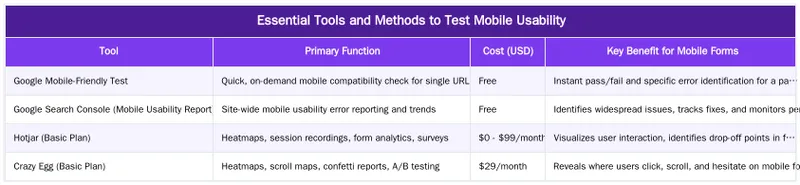
Start assessing mobile form performance with Google’s free tools. The Google Mobile-Friendly Test provides a pass/fail assessment of a page’s mobile-friendliness, highlighting issues like content wider than the screen or text that is too small to read. The Mobile Usability report in Google Search Console provides a site-wide overview of mobile-specific errors. This report flags problems like small tap targets or incorrect viewport settings, which are critical for form optimization. Fixing these technical issues is the baseline for mobile conversion rate optimization and building a patient acquisition funnel.
Common Mobile Usability Challenges in Medical Forms
Medical consultation forms have unique challenges on mobile devices. The sensitive nature of patient data and need for clear communication require careful design. Common problems include small interactive elements, complex layouts, and performance bottlenecks that deter users.
Designing for Optimal Tap Targets and Form Fields
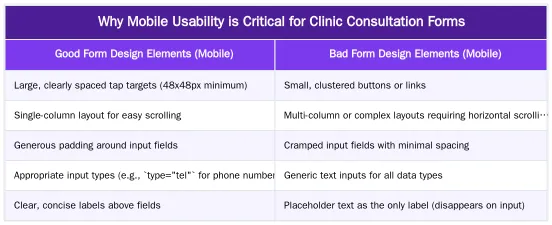
Poorly designed tap targets and form fields are a common issue in mobile forms. Small buttons, checkboxes, or radio buttons are difficult to select with a finger, leading to frustration and errors. Overlapping links or CTAs worsen this problem. Form fields that are too narrow, have small font sizes, or lack appropriate input types (e.g., a text field for phone numbers) make data entry cumbersome. User experience testing reveals these friction points where patients struggle or abandon the form. Optimizing these elements improves conversion rates.
Performance and Responsiveness: Beyond Basic Design
Technical performance and responsiveness also impact mobile form usability. Slow loading times, from unoptimized images or excessive scripts, can lead to immediate abandonment. Non-responsive layouts requiring pinch-to-zoom or horizontal scrolling create a poor experience. Excessive scrolling on long forms also contributes to user fatigue. Google’s mobile-first indexing, which uses the mobile version for ranking, requires a fast, responsive mobile site. Web development should prioritize speed and adaptability to different screen sizes, as detailed in our Mobile-First Indexing: Designing Responsive Websites for Patient Journeys guide.
Essential Tools and Methods to Test Mobile Usability
To test mobile usability for consultation forms, combine technical audits with user behavior analysis. Use tools from Google and other user experience testing platforms.
Leveraging Google Search Console and Mobile-Friendly Test
Google Search Console (GSC) is essential for identifying mobile usability issues. The “Mobile Usability” report in GSC lists pages with errors by issue type (e.g., “Text too small to read,” “Clickable elements too close together”). Prioritize errors on critical pages like your consultation form. The Google Mobile-Friendly Test provides a quick check for individual URLs and immediate feedback on mobile compatibility. These tools identify and help resolve technical barriers to a good mobile experience. Use them as the first diagnostic step before deeper user behavior analysis.
Advanced User Experience Testing with Analytics and Heatmaps
After resolving basic technical issues, use advanced user experience testing for deeper insights into patient interactions with mobile forms. Form analytics tools (e.g., Hotjar, Crazy Egg) track field interactions, completion rates, and drop-off points. This data reveals fields causing friction, informing conversion rate optimization. Heatmaps show where users tap, scroll, and hesitate, highlighting areas of interest or frustration. Session recordings provide video playback of user journeys to identify subtle usability issues. These methods are crucial for optimizing form field design and user flow.
Optimizing Mobile Consultation Forms for Higher Conversions
Optimizing mobile consultation forms for medical clinics requires balancing user experience with healthcare demands like patient data privacy and GDPR compliance. This detail boosts conversion rates and patient acquisition.
Best Practices for Form Field Design and User Flow
Prioritize simplicity and clarity in mobile form design. A single-column layout minimizes horizontal scrolling and maintains a consistent user flow. Clear, concise labels placed above form fields are more accessible than placeholder text, which disappears upon input. Using appropriate input types (e.g., `type=”email”`, `type=”tel”`) brings up the correct keyboard, streamlining data entry. Use progress indicators for long forms to show users their position. Minimize required fields and ask only for essential information to reduce effort. Submission buttons should be large, clearly labeled, and have large tap targets.
Ensuring Patient Data Privacy and GDPR Compliance
For medical consultation forms, patient data privacy and GDPR compliance are mandatory. Clinics must ensure secure data transmission through HTTPS, communicate their privacy policy, and obtain explicit consent for data processing. This involves large, easy-to-tap checkboxes for consent. Poor mobile usability can cause data entry errors or failure to obtain consent if checkboxes are too small. A transparent, secure mobile form builds trust, which is critical for YMYL (Your Money Your Life) content and reinforces the clinic’s E-E-A-T (Experience, Expertise, Authoritativeness, Trustworthiness) signals. Regularly review forms for GDPR compliance to ensure data handling is transparent and secure.
Driving Patient Acquisition: The Impact of Seamless Mobile Forms
For medical clinics like plastic surgeons and aesthetic clinics in competitive markets like London, mobile forms directly drive patient acquisition and revenue. An optimized mobile experience contributes to a clinic’s online reputation and search performance, reinforcing its authority and trustworthiness.
From Usability to E-E-A-T: Building Trust with Mobile Patients
A usable, secure mobile form creates a positive user experience, reinforcing E-E-A-T signals for Google. An intuitive, fast, secure mobile form reflects the clinic’s professionalism. This demonstrates expertise, authoritativeness, and trustworthiness. For YMYL (Your Money Your Life) sectors like healthcare, these signals are critical for ranking and building patient confidence. Prioritizing patient experience in form submission builds trust and contributes to a high-converting website for plastic surgeons. For more on E-E-A-T, refer to Google’s Search Quality Rater Guidelines.
The Semantic SEO Advantage for High-Converting Forms
Semantic SEO considers how search engines interpret a form’s intent and value, in addition to user experience. Well-structured, mobile-friendly forms contribute to a lower ‘Cost of Retrieval’ for Googlebot. Search engines can then more efficiently crawl, understand, and index your forms, improving site performance and ranking potential. Semantically clear, technically sound forms enhance topical authority and signal a high-quality patient journey to search engines. This approach integrates technical web development with advanced SEO, as explored in Reducing Cost of Retrieval: Technical SEO for Efficient Medical Website Performance.
Ready to Optimize Your Clinic’s Mobile Consultation Forms?
Optimizing your clinic’s mobile consultation forms is critical to maximizing patient acquisition and strengthening your online presence. A good mobile experience builds trust, improves conversion rates, and reinforces your clinic’s E-E-A-T signals.
Partner with a Specialist for Unmatched Results
Specialized expertise is key to enhancing your medical website’s mobile experience and patient acquisition strategy. Abdurrahman Şimşek, a London-based Semantic SEO Strategist, offers solutions for medical clinics, plastic surgeons, and aesthetic practices. With expertise in the London private healthcare market and semantic engineering, we can improve your digital presence. Our Medical SEO Services for Surgeons can drive growth for your practice.
Conclusion
Testing and optimizing mobile usability for online consultation forms is essential for medical clinics. Using Google’s tools, advanced user experience testing, and adhering to data privacy standards all contribute to an efficient patient acquisition funnel. A mobile-friendly form enhances the patient journey and strengthens your clinic’s E-E-A-T and SEO performance. For a strategy integrating technical and semantic SEO, partner with a specialist. Book a Semantic SEO Audit today to improve your clinic’s online presence, or reach out directly via our Direct WhatsApp Strategy Line: +90 506 206 86 86.
Frequently Asked Questions
What is the first step to test mobile usability of our clinic’s consultation form?
Begin with Google’s Mobile-Friendly Test and the Mobile Usability report in Google Search Console. These free tools are crucial when you test mobile usability, as they immediately highlight technical issues like content overflow or tiny tap targets, providing an essential baseline for your audit.
What are the most common usability issues with mobile forms for patients?
Common problems include excessively small font sizes, difficult-to-tap buttons and fields, requiring too much manual typing, and having an overwhelming number of form fields. These issues create significant friction, leading to high abandonment rates among prospective patients.
What tools can help me test mobile usability effectively for my forms?
Implementing heat mapping tools like Hotjar or Microsoft Clarity is highly effective. These tools allow you to visually observe user interactions, such as taps, scrolls, and drop-offs, providing invaluable data to pinpoint specific design elements causing usability problems when you test mobile usability.
Is a single long form or a multi-step form better for mobile users?
For mobile devices, a multi-step form is generally superior. It breaks the process into smaller, more manageable sections, which reduces cognitive load and makes the form feel less daunting. Including a progress bar further enhances the user experience and completion rates.
How does improving mobile form usability impact patient acquisition for clinics?
A streamlined and easy-to-use mobile consultation form directly boosts conversion rates. By removing friction, you simplify the process for potential patients to request appointments, effectively transforming website traffic into valuable leads for your medical practice.
How can I get expert help to test mobile usability for my clinic’s forms?
For specialized assistance, consider booking a Semantic SEO Audit with Abdurrahman Simsek. With over 10 years of experience, he can help you test mobile usability and optimize your forms for higher conversions. You can also reach out directly via WhatsApp at +90 506 206 86 86 for a strategy discussion.
Ruxi Data brings together multi-model AI, automated website crawling, live indexation checks, topical authority mapping, E-E-A-T enrichment, schema generation, and full pipeline automation — from crawl to WordPress publish to social posting — all in one platform built for agencies and freelancers who run on results.