
Lazy Loading Vs. Eager Loading: Optimizing Medical Site Performance
Understanding lazy loading vs eager loading is crucial for optimizing medical websites, where page speed directly impacts user trust and search engine rankings. This article details how these image loading strategies influence Core Web Vitals, particularly LCP optimization, for critical medical imagery. Eager loading fetches all images immediately, potentially slowing initial page display. Conversely, lazy loading defers non-critical image requests until they enter the viewport, conserving bandwidth and improving perceived performance. Choosing the correct image loading strategy is vital for enhancing patient experience and driving patient acquisition for clinics.
Abdurrahman Şimşek, a Semantic SEO Strategist, provides expert guidance on technical SEO and web development for medical clinics. His specialization includes optimizing complex site elements like image loading to improve Core Web Vitals and overall digital performance for healthcare providers.
To explore your options, contact us to schedule your consultation.
Understanding lazy loading vs eager loading is critical for optimizing medical websites, where page speed directly influences user trust and search engine rankings. This article details the technical implications of these image loading strategies for medical imagery, Core Web Vitals, and patient acquisition for clinics in 2026.
Lazy Loading vs. Eager Loading: Understanding Core Image Strategies
The difference between lazy and eager loading is when a browser fetches image resources. Eager loading is the default behavior, fetching all images immediately. Lazy loading defers image requests until they are needed, typically when entering the user’s viewport. This choice is critical for page performance on content-rich medical websites.
What is Eager Loading?
Eager loading is the browser’s default method of fetching all image resources as soon as the HTML is parsed. Every image on a page, regardless of visibility, is downloaded during the initial page load. This approach can consume significant bandwidth and processing power, slowing the initial display of critical content on pages with many high-resolution medical images.
What is Lazy Loading?
Lazy loading defers loading non-critical resources, like images, until they are needed. Images are loaded only when they are about to enter the user’s viewport. This conserves bandwidth, reduces initial page load times, and improves resource utilization, which is beneficial for pages with extensive galleries or long-scrolling content.
How Image Loading Strategies Impact Core Web Vitals for Medical Sites
The image loading strategy directly influences a website’s Core Web Vitals—metrics for user experience and search engine ranking. Optimizing these metrics is critical for medical websites, where trust and immediate access to information are vital.
Optimizing Largest Contentful Paint (LCP)
Largest Contentful Paint (LCP) measures the time for the largest content element on a page to become visible. On medical websites, this is often a hero image, a surgeon’s profile picture, or a ‘before-and-after’ visual. Incorrectly lazy-loading this element can delay its rendering, causing a poor LCP score. Eagerly loading and prioritizing critical images improves LCP. For a deeper dive into optimizing LCP for medical sites, refer to our Core Web Vitals for Surgeons guide.
Perceived Performance and Patient Experience
Fast image loading impacts perceived performance. A medical website that loads quickly appears more professional and trustworthy to patients, which is critical for Your Money Your Life (YMYL) content. A slow site with delayed images can erode confidence, increase bounce rates, and deter patients from booking consultations.
When to Use Lazy vs. Eager Loading for Critical Medical Imagery
The decision between eager and lazy loading depends on an image’s position and importance to the user’s initial experience.
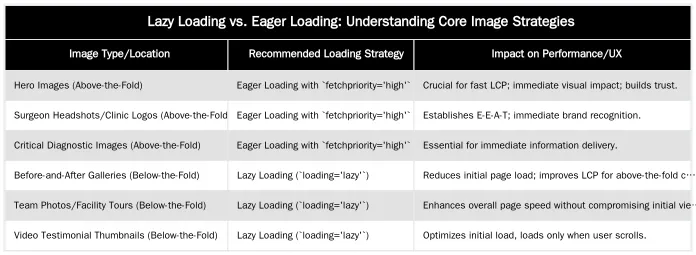
Above-the-Fold: Prioritizing Eager Loading with `fetchpriority`
Eager loading is preferred for images visible within the initial viewport (above-the-fold). This includes hero images, surgeon headshots, and clinic logos that establish immediate credibility. To accelerate these critical elements, use the `fetchpriority=’high’` attribute. This tells the browser to prioritize fetching these resources, contributing to a faster Largest Contentful Paint. Learn more about LCP optimization for surgical pages in our guide on achieving sub-2.0s LCP.
Below-the-Fold: Lazy Loading for Galleries and Testimonials
Images outside the initial viewport (below-the-fold) are ideal for lazy loading. This includes ‘before-and-after’ galleries, team photos, facility tours, or video testimonial thumbnails. Native browser lazy loading with the `loading=’lazy’` attribute defers their download until the user scrolls near them. This reduces initial page weight, improves initial render times, and conserves bandwidth.
Advanced Loading Techniques for Medical SEO
Optimizing image loading for medical websites requires considering the critical rendering path and integration with a semantic SEO framework. As a Semantic SEO Strategist, Abdurrahman Şimşek emphasizes these considerations for YMYL content to ensure speed and E-E-A-T signals.
Optimizing the Critical Rendering Path for Patient Trust
The critical rendering path is the sequence of steps a browser takes to render a page’s initial view. Efficient image loading for above-the-fold content shortens this path. Minimizing render-blocking resources and prioritizing essential visuals allows medical websites to display information more quickly. This speed helps establish E-E-A-T (Experience, Expertise, Authoritativeness, Trustworthiness) signals, as patients perceive a fast site as reliable. For further reading, consult MDN Web Docs on the Critical Rendering Path.
The Role of `loading` Attribute and Browser Support
The `loading` attribute (`lazy`, `eager`, `auto`) provides native browser control for image loading. `loading=’lazy’` is widely supported in modern browsers as of 2026 and is the primary method for deferring images. `loading=’eager’` is the default, but explicit use can reinforce intent. While JavaScript solutions exist, the native HTML attribute is more performant and easier to maintain. Incorrect implementation, like lazy-loading images in the initial viewport, can harm performance. Optimizing other non-critical resources, such as deferring CSS and JavaScript, complements image loading strategies for page speed, as discussed in our article on deferring non-critical CSS and JavaScript on surgical service pages.
Implementing Image Loading: A Technical Checklist for Clinics
Implementing optimal image loading requires auditing performance, identifying critical images, and applying correct HTML attributes.
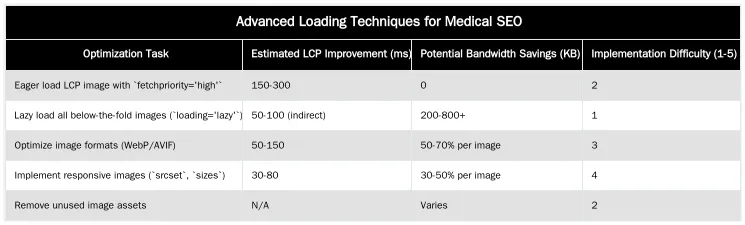
Auditing Your Current Image Loading Performance
Audit your website’s performance with tools like Google Lighthouse, PageSpeed Insights, and Chrome DevTools. These tools identify the Largest Contentful Paint (LCP) element, pinpoint render-blocking images, and highlight optimization opportunities. Pay attention to high-resolution ‘before-and-after’ galleries, which often contain many images that impact load times. Our guide on auditing image compression on ‘before & after’ galleries provides detailed steps.
Code Implementation: HTML Attributes and JavaScript Fallbacks
For modern browsers, add `loading=’lazy’` to `` tags for below-the-fold content. For critical above-the-fold images, use eager loading (default or `loading=’eager’`) and add `fetchpriority=’high’`. For example: `
 `. For compatibility with older browsers, a lightweight JavaScript fallback can be used, but native attributes are preferred.
Adapting to Evolving Web Performance
Image loading optimization is an ongoing process. Medical websites must continuously adapt to evolving web performance standards to maintain a competitive edge and patient trust. As search engine algorithms evolve, integrating technical SEO with a semantic framework is essential for patient acquisition.
Discover advanced semantic SEO strategies for your medical practice.
Frequently Asked Questions
What is the fundamental difference between lazy loading and eager loading?
Eager loading is the default browser behavior, fetching all images as soon as the page’s HTML is parsed. In contrast, lazy loading vs eager loading dictates that images are only downloaded when they are about to enter the user’s viewport. This strategic deferral significantly saves bandwidth and accelerates the initial page load time.
For a surgeon’s ‘before and after’ gallery, which images should be eager loaded?
Only images immediately visible ‘above the fold’ without scrolling should utilize an eager loading strategy. This typically includes the main hero image or the first one or two images in a gallery. Prioritizing these ensures the Largest Contentful Paint (LCP) metric is optimized for a fast user experience.
When is lazy loading the best choice for medical imagery?
Deferred image loading is ideal for all images located ‘below the fold’ on a webpage. For extensive procedure pages or large image galleries, this prevents the browser from downloading numerous high-resolution images that a user might never view. This approach dramatically improves initial page speed and overall site performance.
Can lazy loading vs eager loading impact a website’s SEO?
Incorrect implementation of lazy loading can indeed harm SEO, particularly if critical above-the-fold content, like the main LCP image, is delayed. However, when comparing lazy loading vs eager loading, correctly applying lazy loading to off-screen images significantly boosts page speed and user experience, which are positive SEO signals.
How do image loading strategies like lazy loading vs eager loading affect Core Web Vitals for medical sites?
The choice between lazy loading vs eager loading directly impacts Core Web Vitals. Eager loading critical above-the-fold images improves Largest Contentful Paint (LCP) by making them render quickly. Conversely, correctly implementing lazy loading for off-screen images reduces initial page load, positively influencing LCP and First Input Delay (FID) by freeing up main thread resources.
How can Abdurrahman Şimşek help my clinic implement optimal image loading strategies?
Abdurrahman Şimşek specializes in optimizing medical websites for performance and SEO, including expert implementation of image loading strategies. We analyze your site’s specific needs, ensuring critical imagery is delivered efficiently to improve Core Web Vitals and enhance patient acquisition. Contact us for a tailored consultation to boost your clinic’s online presence.
Ruxi Data brings together multi-model AI, automated website crawling, live indexation checks, topical authority mapping, E-E-A-T enrichment, schema generation, and full pipeline automation — from crawl to WordPress publish to social posting — all in one platform built for agencies and freelancers who run on results.