
Minimize Cumulative Layout Shift: Enhance Video Testimonial Stability
To minimize cumulative layout shift on pages with video testimonials, web developers must proactively reserve space for embedded videos. This guide explains how undefined video dimensions cause unexpected content shifts, impacting user experience and Core Web Vitals. Strategies include explicitly setting aspect ratios using CSS, employing placeholder elements, and pre-loading video players efficiently. Implementing these CLS optimization techniques ensures visual stability, improving web performance and patient trust on medical websites. A stable layout prevents misclicks and enhances overall site professionalism.
Abdurrahman Şimşek, a Semantic SEO Strategist specializing in high-authority medical content networks, provides expert insights into web performance. His 10+ years of experience in technical web development and holistic SEO strategy ensure practical, impactful solutions for YMYL sites. This content reflects his expertise in optimizing critical Core Web Vitals for enhanced user experience.
To explore your options, contact us to schedule your consultation.
Video testimonials build trust in medical practices, but improperly embedded videos can cause Cumulative Layout Shift (CLS), harming user experience and SEO. This guide details how to minimize cumulative layout shift on pages with video testimonials. A stable layout prevents content jumps, which impacts patient perception, search engine rankings, and trust when viewing sensitive medical information.
What is Cumulative Layout Shift (CLS) and Why It Matters for Medical Websites?
Cumulative Layout Shift (CLS) measures the sum of all unexpected layout shifts on a page, which occur when a visible element changes position between rendered frames. As a Core Web Vitals metric, CLS directly influences user experience scores and search engine ranking. For medical websites, a stable layout is paramount. Unexpected shifts cause misclicks and frustration, diminishing the perception of professionalism and eroding patient trust.
Understanding the Core Web Vitals Metric
CLS is one of three Core Web Vitals metrics, with Largest Contentful Paint (LCP) and First Input Delay (FID), that quantify user experience: loading, interactivity, and visual stability. Google uses these signals to assess page experience, a ranking factor. A low CLS score (0.1 or less) indicates a visually stable page, improving user satisfaction and SEO. Our Core Web Vitals for Surgeons guide addresses their impact on procedure and gallery pages.
The Root Cause: How Video Testimonials Trigger CLS
Video testimonials, while building credibility, are a frequent cause of high Cumulative Layout Shift scores. The issue is the browser’s rendering process. If an embedded video’s dimensions are not explicitly defined, the browser allocates zero space for it. When the video player’s JavaScript loads, it injects the player, demanding space and pushing down subsequent content. This causes an unexpected layout shift.
The Problem with Undefined Video Dimensions
Many video embedding codes from platforms like YouTube or Vimeo lack explicit width and height attributes for initial layout. When the video player renders, it forces other elements like text, images, or calls-to-action to jump downwards. This is especially problematic on mobile devices, where small shifts can disrupt reading or cause mis-taps.
iFrame Loading and Dynamic Content Injection
Most embedded videos use an “, a separate browsing context that loads independently and often asynchronously. While asynchronous loading aids page speed, it exacerbates CLS if the iFrame’s dimensions are not pre-defined. The iFrame’s content can dynamically resize the frame after rendering, causing a layout shift. Some embeds also use JavaScript to inject the video player, which triggers shifts if space is not reserved in advance.
Actionable Strategies to Minimize Cumulative Layout Shift for Videos
To address CLS from video embeds, reserve space for the video player before it loads. These technical solutions inform the browser how much space the video will occupy, preventing content shifts and improving visual stability.
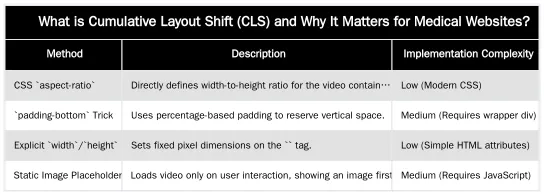
Leveraging the CSS `aspect-ratio` Property
The CSS `aspect-ratio` property is an efficient solution for reserving space for embedded videos. It defines the width-to-height ratio (e.g., 16:9), allowing the browser to calculate the necessary height based on the available width, which prevents layout shifts.
.video-container {
  width: 100%; /* Or a fixed width */
  aspect-ratio: 16 / 9;
}
iframe {
  width: 100%;
  height: 100%;
}
This approach is widely supported by modern browsers. For older browsers, a fallback method using `padding-bottom` can be used.
Implementing Static Placeholders and Sizing Containers
Another method is to wrap the video embed in a sized container. This can be done by setting explicit `width` and `height` attributes on the “ or by using a `padding-bottom` trick for responsive videos.
.video-responsive {
  position: relative;
  padding-bottom: 56.25%; /* 16:9 aspect ratio (9/16 = 0.5625) */
  height: 0;
  overflow: hidden;
}
.video-responsive iframe {
  position: absolute;
  top: 0;
  left: 0;
  width: 100%;
  height: 100%;
}
This technique creates a box that maintains the correct aspect ratio, and the video loads within this pre-defined space. A static image placeholder is another option: a lightweight image (like a thumbnail) occupies the video’s dimensions, and the video player loads only when the user clicks it. This prevents initial layout shifts by delaying the video asset.
| Aspect Ratio | CSS `aspect-ratio` Value | `padding-bottom` % |
|---|---|---|
| 16:9 (Widescreen) | 16 / 9 | 56.25% |
| 4:3 (Standard) | 4 / 3 | 75.00% |
| 1:1 (Square) | 1 / 1 | 100.00% |
Beyond Technical Fixes: Ensuring a Seamless Patient Experience
For medical websites, especially those for plastic surgeons and aesthetic clinics, user experience correlates with patient trust and perceived professionalism. An unstable or unpredictable website can signal a lack of attention to detail, eroding confidence. A stable layout keeps patient focus on the information and testimonials, not on page movements.
CLS and Patient Trust in Medical Content
Medical content is “Your Money Your Life” (YMYL), which Google holds to high Expertise, Experience, Authoritativeness, and Trustworthiness (E-E-A-T) standards. A visually unstable site with high CLS undermines these signals. Patients expect professionalism, which an unstable site contradicts. A predictable browsing experience reinforces the clinic’s quality and attention to detail, fostering trust, converting visitors, and lowering bounce rates.
Integrating Video Testimonials Thoughtfully
The placement and context of video testimonials are as important as their technical implementation. Place them strategically to address patient concerns or reinforce trust at critical decision points, with surrounding content for context. For example, a video testimonial about a procedure should be on that procedure’s page. This integration, combined with CLS optimization, ensures videos enhance the user journey.
Measuring and Monitoring CLS: Tools for Medical Site Owners
Google tools can measure your CLS score and pinpoint elements causing shifts. Regular monitoring is necessary to ensure new content does not introduce layout stability problems. The target CLS score for a good user experience is 0.1 or less.
Using Google Lighthouse and PageSpeed Insights
Google Lighthouse is an open-source, automated tool that audits performance, accessibility, SEO, and more. A Lighthouse audit (in Chrome DevTools or via PageSpeed Insights) provides a CLS score and a breakdown of layout shifts. PageSpeed Insights offers both lab data (simulated) and field data (from the Chrome User Experience Report). These tools highlight shifted elements, their impact, and suggest remedies. The “Avoid large layout shifts” diagnostic helps identify problematic video embeds.
Leveraging Google Search Console for Site-Wide CLS Insights
For a site-wide view, Google Search Console’s Core Web Vitals report is indispensable. It uses real user data (field data) from Chrome users, representing actual visitor performance. The report categorizes pages as “Good,” “Needs improvement,” or “Poor” based on CLS, LCP, and FID scores. It allows you to identify poorly performing URLs to prioritize optimization. Regular monitoring helps track optimization impact and maintain site-wide visual stability.
Elevate Your Clinic’s Online Presence: Partner with a Specialist SEO Strategist
Optimizing for Core Web Vitals like Cumulative Layout Shift is critical for a medical clinic’s digital strategy, patient experience, and SEO performance. For London-based plastic surgeons and aesthetic clinic owners, navigating these technical complexities is challenging. Abdurrahman Şimşek specializes in building high-authority Semantic Content Networks and web performance for the medical sector. To dominate local organic search across Harley Street, attract high-value patients, and ensure your website reflects your clinic’s professionalism, review our plastic surgery SEO blueprint. Book a consultation to optimize your web performance and semantic authority.
Conclusion
Managing Cumulative Layout Shift (CLS) on pages with video testimonials is vital for user experience and SEO on medical websites. Implementing strategies like the CSS `aspect-ratio` property, static placeholders, and defined iFrame dimensions prevents layout shifts. This technical diligence improves Core Web Vitals scores, enhances patient trust, and signals professionalism. A stable website is a cornerstone of E-E-A-T in the YMYL medical sector, ensuring video testimonials positively impact clinic reputation and patient acquisition. For guidance, visit abdurrahmansimsek.com.
Frequently Asked Questions
What is the main reason video testimonials cause high Cumulative Layout Shift (CLS)?
The primary cause is embedding videos without specifying their dimensions (width and height) or aspect ratio in the CSS. The browser doesn’t know how much space to reserve, so when the video finally loads, it pushes other content down the page. Learning how to minimize cumulative layout shift starts with addressing these embeds. This ensures a stable viewing experience for potential patients.
How can I embed a YouTube video to minimize cumulative layout shift?
The best modern solution is to wrap the video iframe in a container div and use the CSS aspect-ratio property on that container. This tells the browser to reserve a correctly proportioned block of space for the video before it even loads, preventing any shift. Implementing these techniques helps to minimize cumulative layout shift, ensuring a smoother user experience.
Is self-hosting or embedding better for reducing layout instability?
Embedding from platforms like YouTube or Vimeo is generally better for page speed due to their optimized delivery networks. However, you must implement them correctly to avoid CLS. The key is not where the video is hosted, but whether you’ve reserved space for the video embed in your site’s HTML and CSS. Proper implementation, regardless of hosting, is crucial for preventing unexpected content movement.
Can a video thumbnail or placeholder image help minimize cumulative layout shift?
Yes, using a placeholder image that is the exact size of the video player is an excellent strategy. The image loads quickly, reserving the space, and the heavier video player only loads when the user clicks the play button. This interaction-based loading is an excellent way to minimize cumulative layout shift on initial page load, improving perceived performance.
What tools can help me identify layout shifts on my medical website?
You can use Google’s PageSpeed Insights or the ‘Performance’ panel in Chrome DevTools. These tools will visually highlight the elements that shifted during page load and provide a CLS score. This allows you to pinpoint the exact cause, such as a video testimonial embed, and take corrective action. These insights are vital for optimizing your site’s stability and improving core web vitals.
Why is it crucial for medical clinics to minimize cumulative layout shift on their pages?
For medical clinics, a stable layout is paramount for building patient trust and maintaining a professional online presence. Unexpected content shifts can disrupt the user experience, especially when viewing sensitive medical information, potentially eroding trust. Addressing layout shifts also positively impacts search engine rankings, as CLS is a Core Web Vital, which is critical for YMYL (Your Money Your Life) websites like those for Harley Street clinics.
Ruxi Data brings together multi-model AI, automated website crawling, live indexation checks, topical authority mapping, E-E-A-T enrichment, schema generation, and full pipeline automation — from crawl to WordPress publish to social posting — all in one platform built for agencies and freelancers who run on results.