
Fixing Orphan Pages: Boost Site Visibility & Crawl Efficiency
Effective fixing orphan pages is crucial for maximizing search engine visibility and performance. These isolated web pages lack internal links, hindering content discoverability and wasting valuable crawl budget. This guide details a data-driven workflow for identifying and resolving such pages, improving internal linking, and enhancing link equity distribution across your site. Understanding their detrimental impact on SEO and crawl budget allows for strategic solutions, ultimately reclaiming your site’s organic potential and ensuring all content is discoverable by search engines.
This article provides a comprehensive, data-driven approach to managing website information architecture. It offers practical steps for site audits and leveraging tools like Google Search Console to optimize content discoverability and resource allocation, enhancing overall SEO performance.
To explore your options, contact us to schedule your consultation.
Effective fixing orphan pages is crucial for any website aiming to maximize its search engine visibility and performance. These isolated web pages, often overlooked, can silently undermine your SEO efforts by hindering content discoverability and wasting valuable crawl budget. This comprehensive guide will clarify what these pages are, detail their detrimental effects, and provide a robust, data-driven workflow for identifying and resolving them to unlock your site’s full potential in 2026.
What Are Orphan Pages & Why Do They Harm SEO?
Orphan pages are web pages on your site that have no internal links pointing to them from other pages within the same domain. This lack of internal connectivity makes them inaccessible to both users navigating your site and search engine crawlers attempting to discover and index your content. Consequently, these pages often remain undiscovered by search engines, leading to poor visibility and wasted content efforts.
When search engine bots crawl a website, they follow links to find new content. Without internal links, an isolated page becomes a dead end for crawlers. This directly impacts its ability to be indexed and ranked, effectively making the page invisible in search results. Such pages represent lost opportunities for organic traffic and dilute the overall authority of your website.
Common Causes of Orphan Pages
Orphan pages can arise from various scenarios. Content created without proper internal linking integration is a frequent cause, especially on large sites with many contributors. Website redesigns or migrations often leave old URLs without updated internal links. Deleting parent pages or categories can also sever connections to child pages, rendering them orphaned. Furthermore, improper content management practices, such as failing to link new blog posts from relevant older articles or main navigation, contribute to their proliferation. Pages that were once linked but had their inbound links removed over time also become isolated.
How Do Orphan Pages Impact Your SEO & Crawl Budget?
Orphan pages significantly impede SEO performance by directly affecting a website’s crawl budget and link equity. Search engines allocate a specific crawl budget to each site, determining how many pages they will crawl within a given timeframe. When crawlers expend resources attempting to find unlinked pages or repeatedly visit pages that lead nowhere, it wastes this budget. This means less important pages might be crawled more often, while crucial, well-optimized content could be overlooked or crawled less frequently, delaying its indexing and ranking potential.
Beyond crawl budget, these isolated pages dilute link equity. Link equity, or “link juice,” flows through internal links, distributing authority and relevance across a website. Pages without internal links cannot receive this valuable equity, nor can they pass it on. This weakens the overall authority of the site’s content ecosystem. Valuable content on an orphan page might never rank because it lacks the necessary internal link signals to demonstrate its importance to search engines. This also degrades user experience, as visitors cannot naturally navigate to these pages, leading to missed engagement opportunities.
Orphan Pages vs. Dead-End Pages: A Key Distinction
While both types of pages can hinder user experience and SEO, there is a crucial difference. An orphan page has no internal links pointing to it. A dead-end page, conversely, might have internal links pointing to it, but it contains no outbound internal links to other pages on the site. This means a user or crawler can reach a dead-end page, but cannot navigate further within the site from that point. Both scenarios are problematic, but orphan pages are fundamentally undiscoverable through normal site navigation, posing a more severe challenge for initial indexing and link equity distribution.
Finding & Identifying Orphan Pages: A Data-Driven Workflow
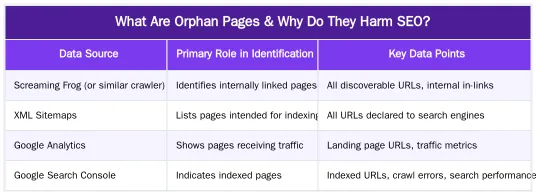
Identifying isolated pages requires a systematic, data-driven approach, cross-referencing information from multiple sources. This method ensures comprehensive coverage and minimizes false positives. The most efficient method for finding all orphan pages involves combining data from a website crawler, your XML sitemaps, and analytics platforms.
The process begins with a comprehensive crawl of your website using a tool like Screaming Frog SEO Spider. This crawl generates a list of all URLs discoverable through internal links. Next, export a list of all URLs present in your XML sitemap(s). These are pages you explicitly tell search engines about. Finally, extract a list of landing page URLs from Google Analytics (GA) that have received organic traffic, and from Google Search Console (GSC) for pages that have appeared in search results. By comparing these lists, you can pinpoint pages that exist but are not internally linked.
Leveraging Screaming Frog, Google Analytics & XML Sitemaps
To execute this workflow, first, run a full crawl of your website with Screaming Frog. Export all ‘Internal (HTML)’ URLs. Second, download your XML sitemap(s) and extract all URLs. Third, go to Google Analytics (e.g., Behavior > Site Content > All Pages) and export a list of pages with significant traffic over a relevant period (e.g., the last 6-12 months). Fourth, check Google Search Console’s ‘Pages’ report under ‘Indexing’ for URLs that are ‘Indexed’ but might not be linked internally. Consolidate all these lists into a single spreadsheet. Then, use spreadsheet functions (like VLOOKUP or conditional formatting) to identify URLs present in your XML sitemap, GA, or GSC data that were *not* found by the Screaming Frog crawl. These discrepancies are strong indicators of orphan pages.
For a more detailed, step-by-step guide on this process, refer to our fixing orphan pages workflow.
Strategic Solutions for Fixing Orphan Pages Effectively
Once identified, resolving isolated pages involves a strategic approach tailored to each page’s value and purpose. The primary goal is to integrate valuable content back into your site’s information architecture. The best way to fix orphan pages often involves a combination of internal linking, content pruning, and redirection, depending on the content’s quality and relevance.
For high-quality, relevant content, implementing smart internal linking is the most effective solution. This ensures the page receives link equity and becomes discoverable. For outdated or low-value content, content pruning (deletion) or redirection to a more relevant page might be appropriate. Each decision should be made with user experience and SEO impact in mind.
Implementing Smart Internal Linking Strategies
Adding internal links to isolated pages should be done contextually and strategically. Identify relevant, authoritative pages on your site that can naturally link to the orphan content. Use descriptive anchor text that accurately reflects the target page’s content, providing both users and search engines with clear context. Prioritize linking from pages with high authority or strong topical relevance. Consider integrating these links into existing navigation, related posts sections, or within the body text of relevant articles. A well-executed internal linking strategy not only resolves the orphan status but also enhances the overall topical authority and user flow of your website. For a deeper dive into optimizing your internal link structure, explore our internal linking audit workflow.
When to Prune or Redirect Orphan Content
Not all isolated pages warrant internal linking. For pages with low quality, outdated information, or no clear user intent, content pruning (deletion) is often the best course of action. Deleting such pages can consolidate crawl budget and prevent search engines from wasting resources on irrelevant content. Before deleting, ensure the page has no valuable backlinks or significant traffic. If it does, consider a 301 redirect to a highly relevant, existing page to preserve any accumulated link equity and guide users to current information. Google Search Central provides comprehensive guidance on implementing 301 redirects. For content that is simply redundant or offers no unique value, pruning can streamline your site. Learn more about strategic content removal with our guide on content pruning for SEO.
Maximizing Link Equity & Crawl Budget: Our Expert Approach
A proactive approach to managing isolated pages is integral to a robust SEO strategy. Our expertise lies in optimizing site architecture and internal linking to ensure maximum SEO benefit. By systematically identifying and addressing these pages, we help websites consolidate link equity, improve crawl efficiency, and enhance overall content discoverability. This contributes to a healthier, more performant website that search engines can easily understand and value. Our methods focus on creating a logical, interconnected web of content that supports both user journeys and crawler pathways, preventing future isolation issues.
We leverage advanced analytical techniques and automation to monitor site health, identify potential orphan content early, and implement scalable solutions. This ensures that valuable content always receives the internal linking it needs to thrive in search results. Our approach transforms potential SEO liabilities into assets, driving organic growth and improving search engine rankings by ensuring every page contributes to the site’s authority.
Building a Resilient Information Architecture
A well-planned information architecture is the foundation of a healthy website, acting as a preventative measure against the creation of isolated pages. It involves structuring your content logically, ensuring clear navigation paths, and establishing a strong internal linking framework from the outset. This proactive design ensures that new content is automatically integrated into the site’s hierarchy, receiving immediate link equity and discoverability. A resilient architecture minimizes the need for reactive fixes and supports long-term SEO success. It guides both users and crawlers efficiently through your content, highlighting important pages and distributing authority effectively. For insights into creating a dynamic and efficient internal linking system, explore our resources on automated internal linking workflow. Further understanding of information architecture principles can be found on resources like UX Matters.
Reclaim Your SEO Potential: Start Fixing Orphan Pages Today
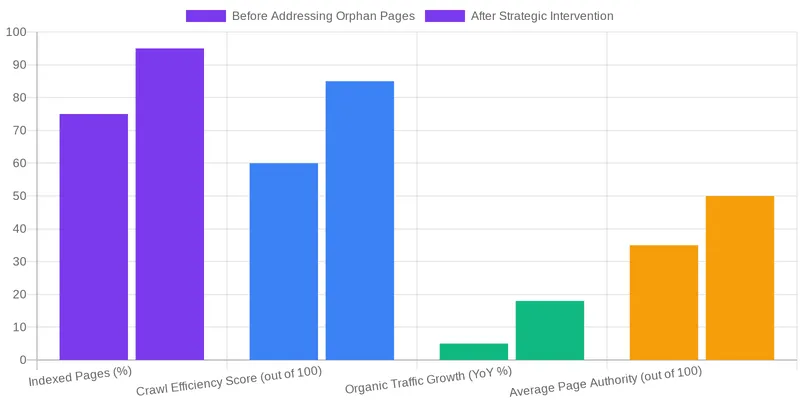
Addressing isolated pages is a fundamental step towards optimizing your website’s SEO performance. By implementing a data-driven workflow for identification and strategic solutions for resolution, you can significantly improve crawl budget utilization, consolidate link equity, and enhance content discoverability. This proactive approach ensures that every valuable page on your site contributes to your overall search engine visibility and user experience. Don’t let hidden pages hinder your online success. Take control of your site’s architecture and unlock its full potential.
Conclusion
Orphan pages represent a significant, yet often unseen, challenge to a website’s SEO health. Their lack of internal connectivity starves them of link equity and wastes valuable crawl budget, ultimately diminishing their visibility in search results. By adopting a systematic approach to identifying these isolated pages through tools like Screaming Frog, Google Analytics, and XML sitemaps, webmasters can gain crucial insights into their site’s architecture. Implementing strategic internal linking, or judiciously pruning and redirecting content, transforms these liabilities into assets. This commitment to a well-structured information architecture not only resolves existing issues but also builds a more resilient and discoverable website. To ensure your website is fully optimized and free from hidden SEO drains, explore how our solutions can streamline your site’s internal linking and content management at abdurrahmansimsek.com.
Frequently Asked Questions
What is the most efficient method for finding pages that need fixing?
The most comprehensive method is to cross-reference multiple data sources. First, crawl your website using a tool like Screaming Frog. Then, compare that list of URLs against a full list of URLs from your XML sitemaps and Google Analytics landing page reports. Any URL that appears in the sitemap or GA but not in the crawl is an orphan that needs attention.
What are the main options for fixing orphan pages once I find them?
You have three primary options for fixing orphan pages. If the page is valuable, integrate it into your site structure by adding internal links from relevant pages. If the page is outdated or low-value, 301 redirect it to a similar, relevant page. If the page has no value and no backlinks, you can delete it and allow it to return a 404/410 status.
Can a page in an XML sitemap still be considered an orphan?
Yes, absolutely. An XML sitemap is a list of URLs you suggest to search engines, but it does not create a crawl path for users or pass link equity. A page is considered an orphan if it has no incoming internal links from the body of other pages on your domain, regardless of its sitemap status.
How many internal links are needed when fixing orphan pages?
When you are fixing orphan pages, aim for at least 3-5 relevant internal links. This is typically enough to signal to Google that the page is part of your site’s main structure and allows link equity to flow to it. Ensure the links come from pages that are themselves well-integrated into the site and contextually relevant.
What is the SEO impact of not fixing orphan pages?
Neglecting to address isolated pages can seriously harm your SEO. These pages are difficult for search engines to find and index, meaning their content won’t rank. This also leads to wasted crawl budget and a poor user experience, as visitors cannot discover the content naturally. The process of fixing orphan pages is crucial for reclaiming lost SEO potential.
How can I prevent orphan pages from being created in the first place?
The best prevention is a robust internal linking process. When publishing new content, always ensure it is linked from other relevant pages on your site. Using automated tools that suggest or add contextual internal links can also ensure new content is integrated into your site architecture from the moment of publication, preventing it from becoming orphaned.
Ruxi Data brings together multi-model AI, automated website crawling, live indexation checks, topical authority mapping, E-E-A-T enrichment, schema generation, and full pipeline automation — from crawl to WordPress publish to social posting — all in one platform built for agencies and freelancers who run on results.