
Object Vs Full Page Caching: Optimizing Web Performance for Speed and Efficiency
Understanding object vs full page caching is crucial for enhancing website performance and reducing server load. This article clarifies the distinct roles of object caching, which optimizes database query optimization and dynamic content generation, and full page caching, which delivers entire static pages instantly. Implementing the correct caching strategy significantly improves time to first byte (TTFB) and overall user experience. Effective caching also directly impacts a site’s Cost of Retrieval, a key factor in semantic SEO performance. Mastering object vs full page caching ensures efficient resource utilization and faster content delivery.
Abdurrahman Şimşek, a Semantic SEO Strategist, specializes in optimizing web architecture for medical clinics and plastic surgeons. His expertise includes leveraging advanced caching strategies to improve site speed, enhance user experience, and reduce the Cost of Retrieval, aligning with robust semantic SEO frameworks.
To explore your options, contact us to schedule your consultation. You can also reach us via: Book a Semantic SEO Audit, Direct WhatsApp Strategy Line: +90 506 206 86 86
Understanding object vs full page caching is key to optimizing website performance for high-traffic platforms like medical clinics. These techniques enhance speed, reduce server load, and improve user experience. Distinguishing between them helps optimize a site’s ‘Cost of Retrieval’ for better SEO performance.
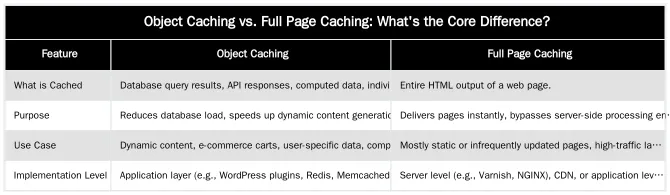
Object Caching vs. Full Page Caching: What’s the Core Difference?
The distinction between object and full page caching is what data they store and when they intervene in the request process. Object caching targets specific data components, like database queries, while full page caching saves a page’s complete HTML output.
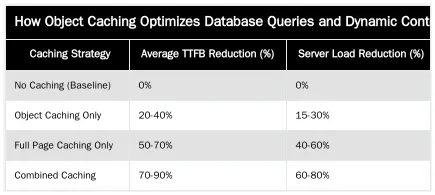
How Object Caching Optimizes Database Queries and Dynamic Content
Object caching stores the results of expensive operations like database queries, API calls, or complex calculations. When a page is requested, the application first checks the cache for these data objects. If found, the cached data is served directly, bypassing the original computation. This reduces database server load and speeds up dynamic content generation.
For websites with frequent database interactions, like a CMS or e-commerce platform, object caching optimizes database queries. It prevents redundant data retrieval, so dynamic elements like user profiles, product listings, or personalized content load quickly without taxing the backend infrastructure.
Leveraging Redis and Memcached
Redis and Memcached are in-memory data stores used for object caching. They provide high-speed temporary storage for frequently accessed data. When an application like WordPress needs data, it queries Redis or Memcached first. If the data is cached, it’s retrieved in milliseconds, much faster than from a disk-based database.
For WordPress, plugins integrate with Redis or Memcached to cache database query results, transient API data, and other dynamic objects. This setup reduces database calls per page load, improving response times. These tools help scaling websites manage traffic spikes by handling large volumes of dynamic content requests.
Full Page Caching: Delivering Instant Pages and Reducing Server Load
Full page caching stores the complete HTML output of a rendered web page. When a user requests that page again, the cached version is served directly, bypassing all server-side processing like database queries, PHP execution, and template rendering. This method reduces server load and improves Time to First Byte (TTFB).
For high-traffic medical sites, full page caching provides near-instant delivery of informational pages like procedure descriptions or clinic details. This enhances user experience and allows the server to handle more requests without performance degradation.
Varnish Cache and CDN Strategies for Medical Websites
Varnish Cache is an HTTP accelerator and reverse proxy that sits in front of a web server. It provides server-side full page caching by intercepting requests and serving cached content from memory. This setup reduces backend server load and improves TTFB for static and frequently accessed pages. For London clinics, Varnish ensures content like surgeon bios or treatment pages loads almost instantaneously for all patients.
A Content Delivery Network (CDN) complements Varnish by extending full page caching to the edge. CDNs store copies of a website’s static assets and pages on globally distributed servers. Content is served from the closest CDN server, minimizing latency and improving TTFB. For a medical practice targeting patients across London and beyond, CDN strategies for London clinics deliver a fast, consistent experience regardless of user location.
Strategic Caching for Medical Websites: Optimizing Cost of Retrieval
A strategic combination of object and full page caching directly impacts the ‘Cost of Retrieval’ (CoR) for medical websites. CoR is the resources (time, CPU, memory, bandwidth) Googlebot uses to crawl, process, and understand content. Efficient caching reduces these costs, improving crawl budget, especially for large medical content hubs.
Minimizing server-side processing and accelerating content delivery with caching frees up server resources. This allows Googlebot to crawl more pages in less time, ensuring critical medical information, new procedure pages, and updated E-E-A-T signals are indexed promptly. This optimization is key to an efficient medical website performance strategy, improving technical SEO and rankings in YMYL (Your Money Your Life) sectors.
Measuring Caching’s Impact on TTFB and Crawl Budget
To monitor caching effectiveness, track metrics like Time to First Byte (TTFB) and changes in Google’s crawl budget. A lower TTFB indicates pages are served faster. Tools like Google PageSpeed Insights, GTmetrix, and server log analysis provide these metrics. A TTFB improvement from 500ms to 50ms for cached pages is a measurable benefit.
Google doesn’t report “crawl budget saved,” but a faster site with fewer server errors allows Googlebot to process more URLs within its allocated crawl rate. This indirect influence on crawl budget is vital for large medical content hubs, ensuring all content is regularly indexed. A Cost of Retrieval Audit can pinpoint areas for improvement.
Pros and Cons of Object vs. Full Page Caching for YMYL Sites
For ‘Your Money Your Life’ (YMYL) medical websites, caching implementation must balance performance with content freshness and accuracy.
| Feature | Object Caching Pros | Object Caching Cons | Full Page Caching Pros | Full Page Caching Cons |
|---|---|---|---|---|
| Benefits | Reduces database strain, speeds dynamic content, supports personalized experiences. | Less impact on initial page load, requires application-level integration. | Drastically improves TTFB, reduces server load, simple for static content. | Can serve stale content if not managed, less effective for highly dynamic/personalized pages. |
| Challenges | Requires careful invalidation for dynamic data, adds complexity to application logic. | Initial setup can be intricate, potential for cache misses if not configured well. | Cache invalidation is critical for content accuracy, especially for YMYL updates. | Can mask underlying performance issues if not used with other optimizations. |
| YMYL Relevance | Ensures fast delivery of patient-specific data, appointment systems, and search results. | Requires robust cache invalidation for medical record updates or critical alerts. | Accelerates delivery of static medical information (procedure guides, clinic details). | High risk of serving outdated medical advice if not properly invalidated upon content updates. |
Implementing a Caching Strategy
A comprehensive caching strategy uses a layered approach, combining server-side caching (Varnish for full pages), application-level caching (Redis for objects), and browser caching. While implementation details vary by architecture (e.g., WordPress, custom builds), the principle is to cache as much as possible, as close to the user as possible.
A layered strategy handles requests at the most efficient point. A browser cache serves assets from the user’s device. If unavailable, a CDN or server-side cache delivers the full page. For dynamic pages, object caching speeds data retrieval. This multi-tiered approach minimizes latency and optimizes resource usage across the delivery chain.
Best Practices for WordPress Performance and Cache Invalidation
For WordPress performance, plugins like WP Rocket, W3 Total Cache, or LiteSpeed Cache manage full page caching and integrate with object caching systems like Redis or Memcached. Correct configuration is vital for medical niches where data accuracy is paramount. Enable cache preloading for critical pages and activate minification and concatenation of CSS/JS.
Cache invalidation prevents serving stale content. When medical information, procedure details, or staff profiles are updated, the corresponding cached pages and objects must be cleared. Most caching plugins automatically invalidate the cache on content updates, but manual clearing is needed for immediate changes. Regular audits and a clear invalidation policy maintain data integrity and E-E-A-T signals.
Elevate Your Clinic’s Performance with Expert Semantic SEO & Caching
Object and full page caching are indispensable for high-performance medical websites aiming for top-tier SEO. Strategic implementation improves site speed, user experience, optimizes ‘Cost of Retrieval’, and strengthens the technical SEO foundation.
For advanced caching and a tailored Semantic SEO strategy, Book a Semantic SEO Audit with Abdurrahman Şimşek to identify opportunities for your London practice. Direct WhatsApp Strategy Line: +90 506 206 86 86.
Frequently Asked Questions
What is the core difference between object caching and full page caching?
Object caching stores results of specific database queries or API calls, reducing the load on the database for repeated requests. Full page caching, conversely, stores the entire generated HTML of a page, allowing the server to deliver it instantly without executing any PHP or database queries. The fundamental distinction in object vs full page caching lies in what data they store and when they intervene in the request process, significantly improving Time to First Byte (TTFB) for visitors.
For a plastic surgery clinic website, which type of caching is more important when considering object vs full page caching?
Both are critical, but they serve different purposes for a medical clinic. Full page caching provides the most significant speed boost for anonymous visitors viewing static pages like treatment descriptions or the homepage, ensuring a fast first impression. Object caching is vital for speeding up the backend for logged-in users and dynamic operations, ensuring a smooth administrative experience and efficient patient portal interactions.
Can using object vs full page caching impact my website’s Cost of Retrieval (CoR) and SEO?
Absolutely. An effective caching strategy, leveraging both object and full page caching, dramatically reduces server processing time and resource usage. This allows search engine crawlers to access and index your content more efficiently, lowering the Cost of Retrieval (CoR) and potentially improving your crawl budget allocation. Optimizing object vs full page caching directly contributes to better site performance metrics, which are crucial for SEO.
What are the typical benefits of implementing a comprehensive caching strategy for a medical website?
Implementing a robust caching strategy significantly enhances user experience by delivering pages faster, reducing bounce rates, and improving patient engagement. It also reduces server load, leading to more stable website performance during peak traffic. For medical clinics, this means a more reliable and professional online presence that supports critical patient information access.
How can Abdurrahman Şimşek help my London clinic optimize its caching and overall SEO?
Abdurrahman Şimşek specializes in holistic SEO strategies, including advanced caching implementation, tailored for medical clinics in London. By analyzing your site’s specific needs, we can design and implement an optimal caching architecture that reduces your Cost of Retrieval and boosts performance. You can book a Semantic SEO Audit to get started or reach out via WhatsApp for direct strategy discussions at +90 506 206 86 86.
Ruxi Data brings together multi-model AI, automated website crawling, live indexation checks, topical authority mapping, E-E-A-T enrichment, schema generation, and full pipeline automation — from crawl to WordPress publish to social posting — all in one platform built for agencies and freelancers who run on results.