
Implementing 301 Redirects: Preserving SEO Value During Site Changes
Implementing 301 redirects is crucial for maintaining SEO performance during website migrations or URL restructuring. This guide details a step-by-step process for mapping and implementing 301 redirects, covering initial URL mapping with tools like Screaming Frog, server-side configurations (.htaccess, Nginx), and WordPress plugin usage. It emphasizes preserving link equity, managing HTTP status codes, and avoiding redirect chains. Advanced strategies, including regular expressions (regex) and ongoing monitoring, are also discussed to ensure seamless technical SEO.
Abdurrahman Şimşek, a Semantic SEO Strategist, provides expert guidance on these technical SEO processes. His insights help businesses navigate complex site changes, ensuring optimal search engine visibility and user experience.
To explore your options, contact us to schedule your consultation. You can also reach us via: Book a Semantic SEO Audit, Direct WhatsApp Strategy Line: +90 506 206 86 86
Implementing 301 redirects is a critical technical SEO task during website migrations or URL restructuring. It preserves link equity and user experience. For high-authority domains like medical clinics, precise redirect management upholds trust, maintains search engine rankings, and optimizes the Cost of Retrieval for search engine crawlers.
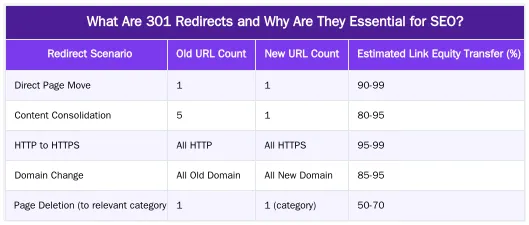
What Are 301 Redirects and Why Are They Essential for SEO?
A 301 redirect is an HTTP status code indicating a permanent move of a web page from one URL to another. For SEO, it signals to search engines that the new URL should inherit the ranking power and authority of the old URL, preserving link equity.
Without redirects, search engines treat the new page as separate, causing a loss of organic visibility and traffic. For users, a 301 redirect automatically forwards them to the correct page, avoiding broken links or 404 errors and improving user experience, a key ranking factor.
Understanding HTTP Status Codes and Redirect Types
HTTP status codes communicate a server request’s outcome. A 301 status means “Moved Permanently.” This contrasts with a 302 redirect (“Found” or “Moved Temporarily”), which indicates a short-term change. For permanent URL changes like a site migration or content consolidation, a 301 is the correct choice. Using a 302 for a permanent move can confuse search engines, hindering link equity transfer and delaying the new URL’s indexing.
The Strategic Importance of 301 Redirects in Site Migrations
Redirects are a strategic component of any website migration or URL change. During a redesign, platform change, or content restructuring, many URLs change. Proper redirection ensures a smooth transition for users and search engines, preventing a drop in organic traffic and maintaining established authority. This is vital for Your Money Your Life (YMYL) websites, such as medical clinics, where trust and authority (E-E-A-T) are paramount.
Preserving Link Equity and Topical Authority
Permanent redirection preserves link equity. External backlinks to old URLs contribute to site authority and page rankings. A 301 redirect passes this “link juice” to the new destination, so the accumulated value is not lost. This maintains topical authority, especially for medical domains that have built credibility. By signaling a permanent move, search engines transfer E-E-A-T signals from the old URL to the new one.
Avoiding Common SEO Pitfalls During URL Changes
Improperly handled URL changes cause severe SEO consequences. The most immediate issue is 404 “Page Not Found” errors, which frustrate users and signal to search engines that content has disappeared. This causes a loss of organic traffic and a decline in search rankings. If content is moved without redirection, search engines might perceive it as duplicate, causing indexing issues. A proper redirect strategy prevents these pitfalls, safeguarding site visibility and user trust.
How to Map Your 301 Redirects: A Step-by-Step Process
A comprehensive URL map is the foundation of a redirect strategy. The process identifies every old URL and pairs it with its new, canonical destination. This minimizes errors and ensures no pages are overlooked during a migration or restructuring.
Crawling Your Existing Site with Screaming Frog
First, obtain a complete list of all current URLs. Use tools like Screaming Frog SEO Spider. Configure the crawler to extract all internal HTML, CSS, JavaScript, and image URLs. Export this data to a spreadsheet for the “old URL” column of your mapping file. This crawl can also identify broken links (4xx errors) and existing redirect chains to be addressed.
Creating Your Old-to-New URL Mapping File
With the list of old URLs, create a mapping file (usually a spreadsheet) with two columns: “Old URL” and “New URL.” For each old URL, determine its new destination. This may involve a one-to-one mapping, consolidating multiple pages into one, or redirecting irrelevant pages to a relevant category or the homepage. Ensure new URLs are canonical and contain the most appropriate content.
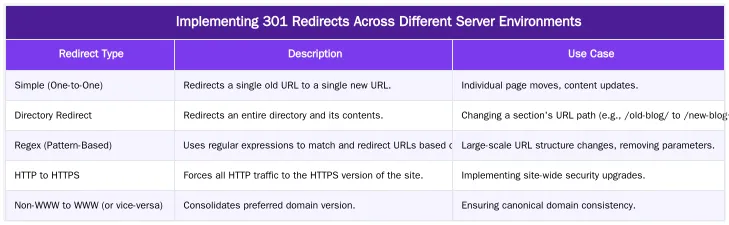
Implementing 301 Redirects Across Different Server Environments
URL redirection deployment methods vary by web server and content management system (CMS). Understanding these differences is crucial for correct implementation and avoiding server configuration errors.
Server-Side Implementation: .htaccess and Nginx
For Apache servers, 301 redirects are commonly implemented by editing the .htaccess file. This file defines rules the server processes before serving content. A basic redirect is: Redirect 301 /old-page.html /new-page.html. For Nginx servers, redirects are configured within Nginx configuration files, typically in the server block. An Nginx redirect is: rewrite ^/old-page.html$ /new-page.html permanent;. Correct syntax is paramount; a small error can cause server issues or broken redirects.
WordPress Redirect Plugins and Best Practices
WordPress plugins offer a user-friendly way to manage redirects without editing server files. Popular options include “Redirection” or “Rank Math.” These plugins provide an interface to input old and new URLs, automatically generating server rules. Use these plugins judiciously, as too many redirect rules can impact site performance. Always test redirects after implementation to ensure they function correctly.
Advanced Redirect Strategies: Regex, Chains, and Crawl Budget
Complex scenarios require more than one-to-one redirects. Advanced techniques like regular expressions and managing redirect chains are vital for SEO health on large websites. These strategies optimize the Cost of Retrieval, ensuring efficient crawling and indexing.
Leveraging Regular Expressions (Regex) for Scalable Redirects
Regular expressions (regex) implement pattern-based redirects, efficient for large-scale URL changes with consistent structures. A single regex rule can handle an entire category of URLs instead of thousands of individual redirects. For example, if all blog posts moved from /blog/year/post-name/ to /articles/post-name/, a regex could capture the post name and redirect it dynamically. This reduces manual effort and human error, making it key for scalable redirect management.
Identifying and Fixing Redirect Chains and Loops
A redirect chain is when a URL redirects multiple times to reach the final destination. Redirect loops are chains where a URL redirects back to itself or a previous URL, creating an endless cycle. Both negatively impact SEO by diluting crawl budget, slowing page load times, and losing link equity. Tools like Screaming Frog identify these chains and loops, allowing you to consolidate them into single-hop redirects (old URL to final new URL), improving efficiency for users and search engine crawlers.
Ensuring Success: Testing, Monitoring, and Ongoing Management
Testing and continuous monitoring are crucial to confirm redirect effectiveness and resolve issues. This ensures long-term site health and performance.
Verifying Redirects and Monitoring Performance
After deployment, verify all redirects function correctly. Use browser extensions (like Redirect Path) or crawlers (like Screaming Frog) to check that URLs resolve to the correct destination with a 301 status. In Google Search Console, monitor the “Crawl Errors” and “Index Status” reports to check for 404s and confirm new URLs are indexed. Monitor for sudden drops in traffic or rankings for redirected pages. For ongoing management, consider automated redirect management solutions.
The Role of a Semantic SEO Strategist in Redirect Management
For complex YMYL sites like medical clinics, redirect management is more than a technical fix. A Semantic SEO Strategist, such as Abdurrahman Şimşek, integrates redirect strategies into a broader semantic SEO framework. This involves preserving link equity and ensuring the new URL structure reinforces topical authority and optimizes the Cost of Retrieval for search engines. By understanding entity relationships and content networks, an expert guides redirects to strengthen the semantic architecture for long-term visibility. This strategic oversight is critical for maintaining E-E-A-T and navigating algorithmic updates. For Google’s perspective on redirects, consult Google Search Central documentation.
Ready to Optimize Your Site’s Redirect Strategy?
Effective URL redirection is a cornerstone of technical SEO, safeguarding site authority and user experience during changes. Each step, from URL mapping to deployment, requires careful attention. For complex migrations or to integrate redirects into a semantic SEO framework, expert guidance is valuable. Mastering 301 redirects helps maintain search visibility and attract patients.
Conclusion
URL redirection is fundamental for any website undergoing changes. Mapping URLs, understanding implementation methods, and using techniques like regex preserves link equity, maintains topical authority, and ensures a good user experience. Continuous testing and monitoring are essential to validate the strategy and address issues. For expert assistance with complex redirect scenarios, site migrations, or to build a semantic content network for your medical practice, contact us. You can also Book a Semantic SEO Audit or reach out via our Direct WhatsApp Strategy Line: +90 506 206 86 86.
Frequently Asked Questions
What is the first step in creating a 301 redirect map for a site migration?
The initial step involves crawling your existing website using a tool like Screaming Frog to compile a comprehensive list of all current URLs. This list forms the crucial ‘old URL’ column of your mapping file, ensuring no valuable pages are overlooked during the migration process. This meticulous approach is fundamental for preserving your site’s SEO value.
Where is the best place for implementing 301 redirects on an Apache server?
The .htaccess file is the most common and efficient location for implementing 301 redirects on an Apache server. This server configuration file allows you to add redirect rules that are processed before the website loads, ensuring fast execution and minimal impact on user experience. For Nginx servers, these rules are typically configured within the server block of your Nginx configuration file.
Should I redirect every old page to the new homepage when implementing 301 redirects?
No, this is a critical mistake that can severely harm your SEO. You should implement a precise page-to-page redirect strategy, mapping each old URL to its most relevant new equivalent. Redirecting everything to the homepage sends a confusing signal to search engines and can be treated as a soft 404, causing a significant loss of valuable rankings and topical authority.
How can I verify that my 301 redirects are working correctly after implementing them?
To verify your redirect implementation, use a tool like Screaming Frog in ‘List Mode.’ Upload your comprehensive list of old URLs, and the tool will crawl them, reporting the status code and final destination URL for each. This process allows you to quickly confirm that every redirect is pointing to the correct new page and functioning as intended.
Does a 301 redirect pass 100% of the old page’s authority or ‘link juice’?
Yes, Google has officially confirmed that 301 redirects now pass the full value of the original link’s authority, or PageRank. This makes the proper implementation of 301 redirects absolutely essential for preserving your SEO rankings and link equity throughout a website migration or URL restructuring. It ensures that the hard-earned authority of your old pages transfers seamlessly to their new counterparts.
How can I get expert help with implementing 301 redirects for my website?
For complex site migrations or to ensure the precise implementation of 301 redirects, you can book a Semantic SEO Audit with Abdurrahman Şimşek. As a Holistic SEO Strategist, he specializes in preserving link equity and optimizing Cost of Retrieval. You can also reach out directly via the WhatsApp Strategy Line at +90 506 206 86 86 for immediate strategic assistance.
Ruxi Data brings together multi-model AI, automated website crawling, live indexation checks, topical authority mapping, E-E-A-T enrichment, schema generation, and full pipeline automation — from crawl to WordPress publish to social posting — all in one platform built for agencies and freelancers who run on results.