
Domain Change Google Search Console: Preserving SEO Rankings and Traffic
Communicating a domain change Google Search Console correctly is essential for preserving search performance and topical authority during a website migration. This guide details the critical steps, including implementing robust 301 redirects, updating DNS settings, and submitting new XML sitemaps. Utilizing the Change of Address tool in Google Search Console directly informs Google of the permanent move, facilitating the transfer of ranking signals and minimizing indexing issues. Proper execution is vital for maintaining E-E-A-T and safeguarding organic traffic, especially for entities like medical practice websites.
Abdurrahman Şimşek, a Semantic SEO Strategist, provides expert guidance on navigating complex site migrations. This content delivers actionable strategies to ensure a smooth transition, mitigating risks associated with domain changes and protecting your digital presence.
To explore your options, contact us to schedule your consultation. You can also reach us via: Book a Semantic SEO Audit, Direct WhatsApp Strategy Line: +90 506 206 86 86
Changing a website’s domain, especially for medical practices where search visibility impacts patient acquisition, requires correctly communicating the domain change in Google Search Console to preserve SEO rankings and topical authority. This guide outlines the steps for a domain migration in 2026.
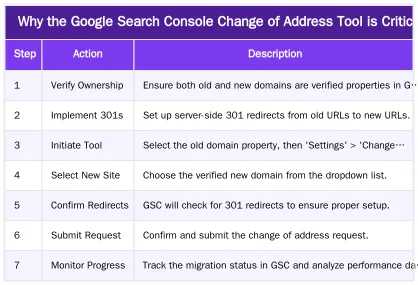
Why the Google Search Console Change of Address Tool is Critical
The Change of Address tool in Google Search Console directly informs Google of a permanent website move. It signals that your site has relocated, facilitating the transfer of ranking signals. Without it, Google may treat your new site as a separate entity, causing significant drops in search visibility and organic traffic. The tool consolidates signals like link equity, topical relevance, and E-E-A-T (Experience, Expertise, Authoritativeness, Trustworthiness), attributing the old domain’s authority to the new one. This minimizes ranking fluctuations and preserves search performance, which is vital for medical practices.
Essential Preparations Before Your Domain Change
Before a domain transfer, use a comprehensive Website Migration SEO Checklist to address technical and content aspects and mitigate SEO risks.
Implementing a Robust 301 Redirect Strategy
A 301 redirect strategy is the cornerstone of a domain migration. Every URL from the old domain must map to its new equivalent. These permanent server-side redirects inform search engines of the move, passing 90-99% of link equity. For large medical sites, this is complex. Use automated redirect management for accuracy with thousands of URLs. Missing or incorrect redirects are a primary cause of post-migration ranking drops and crawl errors.
DNS Updates and XML Sitemap Submission
Update your DNS (Domain Name System) settings by pointing the new domain to your server. Concurrently, create and submit a new XML sitemap for the new domain via its Google Search Console property. The sitemap should list all new canonical URLs, providing Google a content roadmap. Prompt submission helps Google discover and index new content.
Step-by-Step: Using the Change of Address Tool in GSC
With the new domain live, 301 redirects in place, and DNS updated, notify Google using the Change of Address tool.
Verifying Ownership and Initiating the Process
Both old and new domains must be verified properties in your Google Search Console account. If not, add and verify them (e.g., HTML file upload, DNS record, Google Analytics). In GSC, select the old domain property and navigate to ‘Settings’ > ‘Change of Address’. Select the new site from the dropdown list of verified properties. Google will then verify the 301 redirects.
Monitoring the Status and Addressing Warnings
After submission, Google Search Console displays the request status. Monitor this for warnings or errors, such as incomplete 301 redirects or verification problems, and address them promptly. The migration can take several weeks as Google transfers indexing and ranking signals. Monitor GSC reports for both properties to track progress.
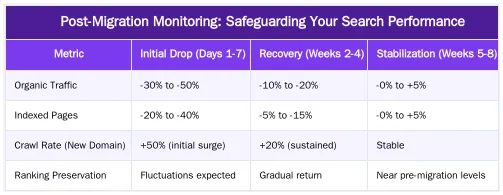
Post-Migration Monitoring: Safeguarding Your Search Performance
Post-migration monitoring is critical. For medical practices, maintaining patient visibility is essential. Monitor crawl errors, indexing issues, and search performance to resolve problems quickly.
Detecting and Fixing Crawl & Indexing Issues
Check the ‘Coverage’ report in Google Search Console for the new domain. Look for 404 (Not Found) errors, which indicate broken redirects or missing pages. Address soft 404s, where a page returns a 200 status with minimal content. The ‘Crawl Stats’ report shows Googlebot’s crawl efficiency. A drop in indexed pages or an increase in ‘Excluded’ URLs suggests indexing issues. Refer to a guide on fixing indexing issues to keep medical content discoverable.
Analyzing Log Files for Cost of Retrieval (CoR) Optimization
Log file analysis provides insight into Googlebot’s interaction with your new domain. Server logs show Googlebot’s crawl patterns and frequency, revealing unexpected behavior. This analysis optimizes ‘Cost of Retrieval’ (CoR)—the resources Google uses to crawl and index your site. High CoR causes inefficient crawling and slower indexing. Post-migration, log files ensure Googlebot efficiently discovers new URLs and the server responds optimally, preserving crawl budget.
Frequently Asked Questions
What is the most critical step when communicating a domain change google search console?
The most critical step for a successful domain change google search console is utilizing the “Change of Address” tool. This explicitly informs Google that your site has moved permanently, helping to transfer ranking signals from the old domain to the new one efficiently. This process should be initiated only after all 301 redirects are correctly in place.
How long should 301 redirects be maintained after a website migration?
It is a non-negotiable best practice to maintain 301 redirects from your old domain to your new one for at least one full year, and ideally, indefinitely. This ensures that both users and search engine crawlers are consistently directed to the new location, preserving link equity and preventing broken user experiences.
Will a domain change in Google Search Console impact my medical practice’s local SEO?
Yes, a domain change can temporarily impact local SEO. It is crucial to update your new domain across all local citations, especially your Google Business Profile, medical directories like Doctify, and any LocalBusiness schemas. A correctly managed domain change in Google Search Console will mitigate negative impacts and re-establish local authority.
What key data should be monitored in GSC following a domain migration?
After the move, closely monitor the Index Coverage report for both the old and new properties to ensure pages from the new domain are being indexed and old ones are being de-indexed. Also, track the Performance report for any significant drops in clicks and impressions and check for any new crawl errors.
Is it necessary to verify both the old and new domains in Google Search Console for a successful migration?
Yes, it is absolutely necessary to verify both the old and new domains as properties in your Google Search Console account before initiating a domain change google search console. This is a prerequisite for using the Change of Address tool and allows you to monitor the migration process from both ends effectively.
How can Abdurrahman Şimşek assist with a complex domain change or SEO strategy?
Abdurrahman Şimşek, a Semantic SEO Strategist with 10+ years of experience, offers expert guidance for complex domain changes, specializing in medical and plastic surgery SEO. You can book a Semantic SEO Audit through his website or reach out directly via WhatsApp at +90 506 206 86 86 for strategic advice.
Ruxi Data brings together multi-model AI, automated website crawling, live indexation checks, topical authority mapping, E-E-A-T enrichment, schema generation, and full pipeline automation — from crawl to WordPress publish to social posting — all in one platform built for agencies and freelancers who run on results.